


Reliable Network Cabling Solutions in Phoenix with Desert Computer Solutions
A slow connection is easy to blame on the internet provider. In many Phoenix buildings, the real problem starts much closer: old cable runs, crowded network closets, unlabeled ports, weak terminations, or wiring that was never planned for today’s devices.
That matters because almost every part of a modern property depends on a clean, reliable connection. Computers, phones, printers, access points, security cameras, card readers, point-of-sale systems, and cloud tools all need a stable path back to the network. When that path is messy, work slows down and problems become harder to trace.
Desert Computer Solutions helps Phoenix organizations plan, install, and improve structured cabling so the physical network can support daily operations. Whether the space is being built out, expanded, cleaned up, or repaired, the goal is simple: cabling that is organized, tested, documented, and ready for the next device.

Why reliable cabling matters more than most people realize
Cable is quiet when it works. When it does not, the symptoms show up everywhere else.
A video call freezes. A payment terminal drops offline. Wi-Fi feels unreliable even though the access point is new. A camera feed cuts out at the worst time. A printer appears, disappears, and appears again. These issues may look unrelated, but weak cabling can sit underneath all of them.
Network Cabling is the foundation that carries data between devices, switches, routers, wireless access points, and equipment rooms. If the foundation is poorly planned, the rest of the system has to fight against it.
Good cabling helps in several practical ways:
Fewer random outages
Proper terminations, cable paths, and tested connections reduce the small failures that drain time.
Cleaner troubleshooting
Labeled ports and documented runs make it easier to find the cause of a problem.
Better device performance
Correct cable type and installation quality help equipment run closer to its expected speed.
Room to grow
A planned cabling system makes it easier to add workstations, access points, cameras, and network gear later.
Less visual and physical clutter
A neat rack or low-voltage panel is safer to work around and easier to maintain.
In Phoenix, there is another layer to consider. Buildings deal with heat, dust, remodels, warehouse layouts, thick walls, and long cable paths. Cabling that works fine in a small room may not be right for a large clinic, shop, school, warehouse, or multi-suite property. The physical environment affects the design.
What Desert Computer Solutions can help plan before installation
A strong project starts before a single cable is pulled. The planning stage decides what type of cable is needed, where each run should go, where the equipment will live, and how the system will be labeled and tested.
Desert Computer Solutions can help turn a vague request like “we need more drops” into a clear cabling plan. That plan should account for current needs without ignoring what will likely be added later.
Device locations and future growth
Every cable run should have a reason. Workstations, wall phones, printers, wireless access points, cameras, conference displays, door controllers, and point-of-sale stations may all need dedicated connections.
A Phoenix business that is adding six workstations today may also add more wireless coverage next year. A warehouse may start with a few access points and later need scanners, cameras, or additional networked equipment. Pulling only the bare minimum can save a little upfront, but it often creates extra work during the next change.
A good plan leaves room for growth without making the project wasteful.
Cable type and speed needs
Not every location needs the same cable. Many commercial projects use copper Ethernet cabling such as Cat6 or Cat6A, depending on bandwidth needs, distance, equipment, and expected lifespan. Fiber may make sense for longer runs, equipment room links, or high-bandwidth connections between areas.
The right choice depends on the building and the devices. A short run to a printer has different needs than a backbone link between network areas. A ceiling access point powered by PoE has different requirements than a basic wall jack.
Proper pathways and code-aware routing
Cabling should not be draped over ceiling tiles, tied to sprinkler pipes, pinched behind furniture, or run carelessly near sources of interference. The route matters.
Low-voltage cabling often needs proper supports, safe clearances, and the right rating for the space. Plenum-rated cable may be required in certain air-handling spaces. Riser-rated cable may be used for vertical runs between floors, depending on the building design and applicable code.
A professional installation looks beyond “can the cable reach?” and asks “is this the right way to route it?”
Common signs a Phoenix property needs cabling work
Some cabling problems are obvious. Others hide behind everyday frustrations. If the same connection issue keeps coming back after equipment has already been restarted or replaced, the wiring deserves a closer look.
Common warning signs include:
Network ports that work only when the cable is moved
Wall jacks with cracked faceplates or loose connections
Unlabeled ports in the network closet
Patch cables hanging without organization
Wi-Fi access points connected through old or questionable cabling
Speeds that test far below what the equipment should support
Devices that fail when using Power over Ethernet
Cable runs that disappear into ceilings with no documentation
Old wiring left behind after remodels
Switch ports filled with mystery connections
Phoenix properties often grow in stages. A suite gets reconfigured. A tenant improvement changes the floor plan. More access points get added. Security cameras move. A storage area becomes a work area. Over time, the cabling can become a patchwork.
That patchwork may work for a while, but it becomes harder to maintain as the property changes. A clean-up project can make a major difference even without replacing every cable in the building.
The hidden cost of unlabeled cabling
Unlabeled cabling wastes time. When a technician has to trace every cable by hand, simple work takes longer. When no one knows which wall jack connects to which patch panel port, changes become risky.
Clear labels help answer basic questions fast:
Which cable serves this workstation?
Which port feeds this access point?
Is this cable active or abandoned?
Can this device be moved without breaking something else?
Which switch port should be checked first?
Labels do not need to be fancy. They need to be consistent, readable, and documented.
What a professional cabling project should include
A professional cabling project is more than pulling wire from one end of a building to another. It includes planning, careful installation, testing, cleanup, and documentation.
Desert Computer Solutions can support these steps so the finished system is easier to trust and easier to maintain.
A site walkthrough
The walkthrough connects the cabling plan to the real building. Wall construction, ceiling access, equipment locations, power availability, and the layout of rooms all affect the job.
During this stage, important questions come up:
Where will the main network equipment sit?
Are there existing pathways that can be reused?
Which rooms need network drops?
Are any runs too long for copper cabling?
Where should ceiling-mounted access points go?
Are there areas with heat, dust, vibration, or limited access?
A walkthrough also helps prevent surprises once installation starts.
Clean installation practices
Good workmanship shows up in the details. Cable should be supported, protected, and routed neatly. It should not be bent too sharply, stretched, crushed, or mixed carelessly with electrical wiring.
At the equipment side, patch panels, racks, cable managers, and labels make the system serviceable. At the room side, wall plates and jacks should be placed where devices will actually be used.
For businesses using phones, cameras, access points, and wired devices, a clean installation also improves safety and appearance. No one wants loose cables crossing floors or tangled bundles hanging where they can be damaged.
Testing and verification
Testing confirms that each cable run performs as expected. A basic continuity check may show that the wires connect, but better testing can help verify wiring order, distance, and performance against the intended cable standard.
This step matters because a cable can appear to work and still cause problems under load. Poor terminations, damaged cable, or incorrect pairing may not show up until the connection is stressed.
A tested and labeled Data Cabling system gives the owner or manager a clearer record of what was installed and how it performs.

Cabling for Wi-Fi, cameras, phones, and daily operations
Many people think cabling is only for desktop computers. In modern buildings, the wired network supports much more.
Wireless access points still need wires
Wi-Fi depends on wired connections. Each access point needs a stable link back to the network, often with power delivered through the same cable using PoE. If the cable behind the access point is weak, the wireless experience suffers.
Strong cabling helps wireless systems deliver better coverage and reliability. It also gives installers more freedom to place access points where they belong, rather than where an old cable happens to end.
Security cameras need stable connections
Many IP cameras rely on Ethernet cabling for both data and power. A poor run can cause camera dropouts, low-quality feeds, or power issues.
Camera placement also affects cable planning. Exterior runs, warehouse ceilings, parking areas, and long corridors may require careful pathway choices and the right materials. The goal is to protect the cable while keeping the cameras connected.
VoIP phones and point-of-sale systems need consistency
Voice and payment systems are sensitive to interruptions. A bad wall jack or damaged patch cable can create problems that look like software or provider issues.
For customer-facing areas, reliable cabling supports smoother transactions and fewer disruptions. In back-of-house areas, it helps staff keep work moving without avoidable connection problems.
Network closets should not be ignored
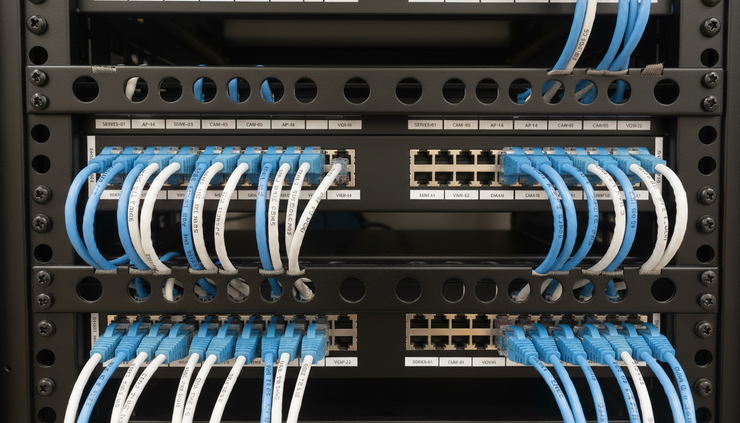
The network closet is where many issues begin. A rack filled with unlabeled patch cables and unsupported wiring makes every future change harder.
A cleanup can include:
Removing abandoned patch cables
Replacing damaged cords
Organizing patch panels
Adding cable management
Updating labels
Separating active and inactive connections
Documenting port assignments
This work may not feel exciting, but it often makes the whole network easier to manage.
Why Phoenix buildings need a local-minded cabling approach
Phoenix conditions can shape cabling choices. Heat, dust, building materials, long distances, and remodel-heavy spaces all affect how technology should be installed.
A cabling plan for a small medical office near a busy road may need to account for dust and tight ceiling access. A warehouse in the Valley may need long runs, high mounting points, and protection from equipment activity. A retail space may need neat public-facing wall plates and strong connections for registers, cameras, and guest Wi-Fi.
Desert Computer Solutions brings value by looking at the building as it is, not as a simple diagram. That means planning for practical details such as access, serviceability, device placement, and future moves.
Copper, fiber, and the right fit
Copper Ethernet cabling works well for many device connections within standard distance limits. Fiber can be the better choice for longer links, high-bandwidth needs, or connections between equipment areas.
The best system may use both. Copper can serve wall jacks, access points, phones, and cameras. Fiber can connect network rooms or support higher-capacity links. The right mix depends on the building and the equipment.
Documentation pays off later
A finished cabling job should leave behind more than working ports. Documentation helps future technicians and managers understand the system.
Useful documentation can include:
Drop locations
Patch panel labels
Cable identifiers
Test results
Network closet photos
Notes on unused or spare runs
This record helps when staff move, equipment changes, or another project begins.

What to expect when working with Desert Computer Solutions
A reliable cabling project should feel organized from the start. Desert Computer Solutions can help by clarifying the scope, identifying the right materials, planning routes, installing cleanly, and testing the finished work.
A typical process may include:
Discuss the need
The project starts with the problem or goal, such as adding drops, supporting new access points, cleaning up a rack, or wiring a new space.
Walk the site
The building layout, pathways, equipment locations, and device needs are reviewed.
Define the scope
The number of runs, cable types, locations, labeling plan, and testing needs are confirmed.
Install the cabling
Cables are routed, terminated, labeled, and connected to the right panels or jacks.
Test and document the work
Each run is checked so the finished system is easier to trust and maintain.
The best time to plan cabling is before a move, remodel, equipment upgrade, or Wi-Fi expansion. The second-best time is when recurring problems make it clear the current setup no longer fits.
Reliable cabling does not draw attention to itself. It quietly supports the systems people use every day. For Phoenix properties that depend on steady connections, Desert Computer Solutions can help build a cleaner, more dependable foundation for the network.


Comments